Turn creative briefs into client-ready frames.
Built for motion designers, by motion designers.
Script
Beats
Click the + buttons on the edges to generate visual idea variations.
Visual Direction A
Click the + buttons on the edges to generate visuals
Visual Direction B
Click the + buttons on the edges to generate visuals
Storyboards
Storyboards
Script
Beats
Click the + buttons on the edges to generate visual idea variations.
Visual Direction A
Click the + buttons on the edges to generate visuals
Visual Direction B
Click the + buttons on the edges to generate visuals
Storyboards
Storyboards
Script
Beats
Click the + buttons on the edges to generate visual idea variations.
Visual Direction A
Click the + buttons on the edges to generate visuals
Visual Direction B
Click the + buttons on the edges to generate visuals
Storyboards
Storyboards

Watch video
How does ScriptScape Work?

Step 1
Start with your script
Paste your brief or script. We'll help you break it into beats—the key moments that need visual treatment. Then you're ready to explore directions

Step 2
Visualize and Branch
Turn beats into styleframes, then test variations—minimal vs. bold, kinetic vs. calm, metaphor A vs. B. Branch freely. No duplicated projects
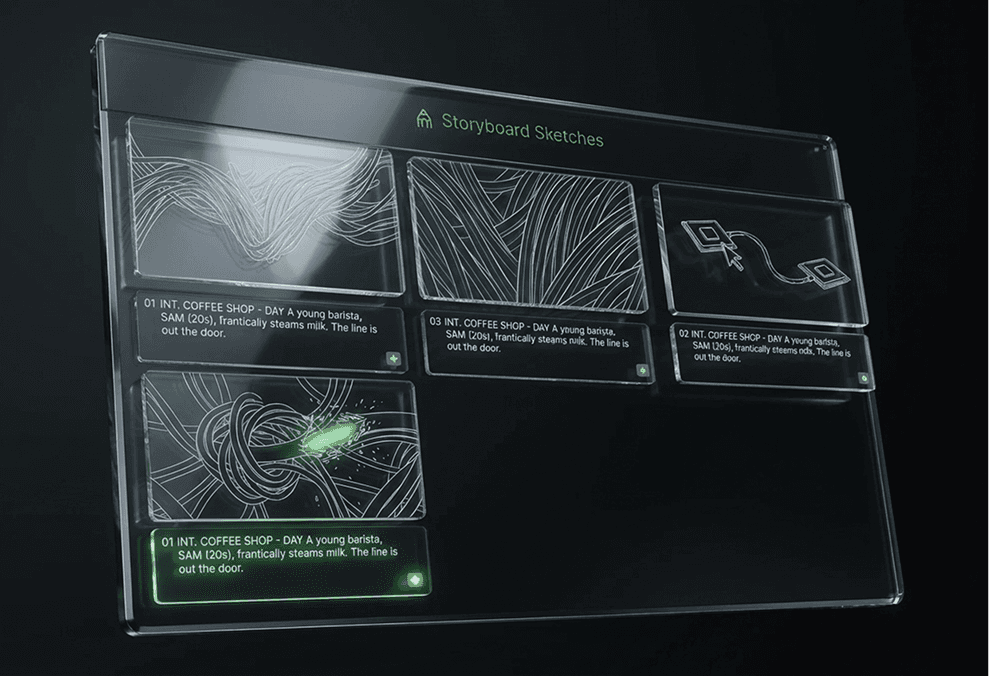
Step 3
Refine and Share
Finalize your visual direction, rearrange beats as needed, then generate a motion animatic to check pacing.
Watch video
How does ScriptScape Work?
Step 1
Start with your script
Paste your brief or script. We'll help you break it into beats—the key moments that need visual treatment. Then you're ready to explore directions
Step 2
Visualize and Branch
Turn beats into styleframes, then test variations—minimal vs. bold, kinetic vs. calm, metaphor A vs. B. Branch freely. No duplicated projects
Step 3
Refine and Share
Finalize your visual direction, rearrange beats as needed, then generate a motion animatic to check pacing.
Watch video
How does ScriptScape Work?
Step 1
Start with your script
Paste your brief or script. We'll help you break it into beats—the key moments that need visual treatment. Then you're ready to explore directions
Step 2
Visualize and Branch
Turn beats into styleframes, then test variations—minimal vs. bold, kinetic vs. calm, metaphor A vs. B. Branch freely. No duplicated projects
Step 3
Refine and Share
Finalize your visual direction, rearrange beats as needed, then generate a motion animatic to check pacing.
Features
Creative planning, built for visual storytellers.
Turn your script into a living visual map.
Turn a linear script into a non‑linear canvas of segments, visual ideas, and storyboard frames, with parent–child links between script, beats, and shot
Get a smart first pass in minutes.
Paste a script and ScriptScape splits it into beats, understands context, and generates visual ideas so you’re never starting from a blank board.
Keep everything in one place.
Segments, shot explorations, variations, and refinements stay connected on a single canvas—so you don’t lose context jumping between tools.
Test a direction fast.
Generate and compare options quickly, then refine only what matters to keep momentum.
Hear the pacing before you commit.
Preview a quick narration to feel timing, tone, and rhythm—then adjust beats with more confidence.
Reuse what already works.
Pull in existing design assets in a click and keep your visual language consistent across frames and versions.
Features
Creative planning, built for visual storytellers.
Turn your script into a living visual map.
Turn a linear script into a non‑linear canvas of segments, visual ideas, and storyboard frames, with parent–child links between script, beats, and shot
Get a smart first pass in minutes.
Paste a script and ScriptScape splits it into beats, understands context, and generates visual ideas so you’re never starting from a blank board.
Keep everything in one place.
Segments, shot explorations, variations, and refinements stay connected on a single canvas—so you don’t lose context jumping between tools.
Test a direction fast.
Generate and compare options quickly, then refine only what matters to keep momentum.
Hear the pacing before you commit.
Preview a quick narration to feel timing, tone, and rhythm—then adjust beats with more confidence.
Reuse what already works.
Pull in existing design assets in a click and keep your visual language consistent across frames and versions.
Features
Creative planning, built for visual storytellers.
Turn your script into a living visual map.
Turn a linear script into a non‑linear canvas of segments, visual ideas, and storyboard frames, with parent–child links between script, beats, and shot
Get a smart first pass in minutes.
Paste a script and ScriptScape splits it into beats, understands context, and generates visual ideas so you’re never starting from a blank board.
Keep everything in one place.
Segments, shot explorations, variations, and refinements stay connected on a single canvas—so you don’t lose context jumping between tools.
Test a direction fast.
Generate and compare options quickly, then refine only what matters to keep momentum.
Hear the pacing before you commit.
Preview a quick narration to feel timing, tone, and rhythm—then adjust beats with more confidence.
Reuse what already works.
Pull in existing design assets in a click and keep your visual language consistent across frames and versions.
Why ScriptScape?
Why ScriptScape?
Why ScriptScape?
A smarter way to do storyboarding
Other Tools
Create 3 concepts = duplicate 3 projects
6 hours to create 15 styleframes by hand
Scattered across Figma, Illustrator, After Effects
Brief arrives Monday, pitch is Thursday
You remake the same coffee cup icon every project
" height="3.6494149768607986px" id="alxpmzZc_" transform="translate(0 6.694)" width="3.6494149659864092px"/><path d="M 10.3 3.646 L 8.452 3.994 L 22.361 3.994 C 22.963 3.994 23.452 4.482 23.452 5.085 L 23.452 20.141 C 23.452 20.744 22.963 21.232 22.361 21.232 L 1.198 21.232 C 0.595 21.232 0.019 20.784 0.019 20.181 L 0.019 15.984 C 0.019 15.381 0.595 14.837 1.198 14.837 L 17.41 14.837 L 17.41 14.798 L 17.523 14.798 C 18.747 14.798 19.739 13.806 19.739 12.582 C 19.739 11.358 18.747 10.366 17.523 10.366 L 4.366 10.366 C 4.259 10.366 4.153 10.374 4.05 10.389 L 1.11 10.389 C 0.508 10.389 0.019 9.9 0.019 9.298 L 0.019 8.628 C 0.308 8.718 0.614 8.766 0.932 8.766 C 2.627 8.766 4.001 7.393 4.001 5.698 C 4.001 4.004 2.627 2.63 0.932 2.63 C 0.643 2.63 0.355 2.67 0.077 2.751 L 0.019 2.443 C -0.092 1.851 0.297 1.281 0.889 1.17 L 2.111 0.94 L 4.459 3.93 L 7.116 3.93 L 4.334 0.521 L 7.104 0 Z" fill="rgb(255, 255, 255)" height="21.23210884353739px" id="TmbZH9r44" transform="translate(1.034 2.776)" width="23.45184107852767px"/><path d="M 5.959 5.473 L 3.275 5.978 L 0 2.347 L 2.763 1.827 L 5.959 5.473 Z M 10.929 4.528 L 11.367 4.455 L 8.253 5.041 L 4.978 1.41 L 7.74 0.89 L 10.929 4.528 Z M 12.369 0.019 C 12.961 -0.092 13.531 0.297 13.642 0.889 L 14.011 2.847 C 14.117 3.41 13.77 3.953 13.228 4.101 L 9.956 0.473 Z" fill="rgb(255, 255, 255)" height="5.977664289617195px" id="oAxwN5UAA" transform="translate(10.34 0)" width="14.02987865393338px"/></g></svg>)
ScriptScape
Branch 3 directions without duplicating work
Generate 15 styleframes in 15 minutes
One canvas. Every direction. Every version.
From brief to pitch-ready frames in one afternoon
Build your asset library once, reuse forever
Other Tools
Create 3 concepts = duplicate 3 projects
6 hours to create 15 styleframes by hand
Scattered across Figma, Illustrator, After Effects
Brief arrives Monday, pitch is Thursday
You remake the same coffee cup icon every project
ScriptScape
Branch 3 directions without duplicating work
Generate 15 styleframes in 15 minutes
One canvas. Every direction. Every version.
From brief to pitch-ready frames in one afternoon
Build your asset library once, reuse forever
Other Tools
Create 3 concepts = duplicate 3 projects
6 hours to create 15 styleframes by hand
Scattered across Figma, Illustrator, After Effects
Brief arrives Monday, pitch is Thursday
You remake the same coffee cup icon every project
ScriptScape
Branch 3 directions without duplicating work
Generate 15 styleframes in 15 minutes
One canvas. Every direction. Every version.
From brief to pitch-ready frames in one afternoon
Build your asset library once, reuse forever
Got questions? We’re here to help you keep moving.
If you don’t see what you’re looking for, drop us a line.
01
What is ScriptScape?
ScriptScape is a creative co-pilot for motion designers. Instead of forcing you into a linear list of shots, it gives you a non-linear workspace where you can branch ideas, test different visual directions side-by-side, and turn scripts into a clear visual plan. It’s built to help you explore "what if" scenarios without losing the thread.
02
How is this different from tools like Boords?
Boords is excellent for linear storyboards and shot lists. ScriptScape is built for exploration and iteration. We use a node-based canvas so you can map out multiple versions of a scene—testing different pacing, transitions, or styles—in parallel. It’s about finding the best idea fast, not just documenting the first one.
03
Who is ScriptScape designed for?
We built it specifically for Creative Directors and Senior Motion Designers who need to move from brief to pitch quickly. If you’re juggling multiple projects or need to present 3–5 visual concepts in the time it usually takes to make one, ScriptScape helps you maintain momentum and creative quality.
04
Can I import my existing scripts?
Yes. You can paste your script (or even a rough creative brief), and ScriptScape helps break it down into visual beats. It identifies the natural flow—hero sections, transitions, feature callouts—so you can jump straight into visualizing the rhythm of the piece.
05
Does it generate voiceovers?
Coming Soon! You'll be able to generate AI voiceovers directly from your script beats, with multiple voice options and pacing controls. This will give you a quick audio foundation for animatics and client reviews, so you can test timing and rhythm before hiring voice talent—keeping you moving fast through the ideation phase.
06
Can I generate styleframes with AI?
Yes. You can generate multiple styleframe variations for any beat in seconds. Think of them as a "quick first pass" to align on mood and composition with your client or team. You can compare options side-by-side, keep what feels right, and refine the rest—keeping you in the driver’s seat.
Got questions? We’re here to help you keep moving.
If you don’t see what you’re looking for, drop us a line.
01
What is ScriptScape?
ScriptScape is a creative co-pilot for motion designers. Instead of forcing you into a linear list of shots, it gives you a non-linear workspace where you can branch ideas, test different visual directions side-by-side, and turn scripts into a clear visual plan. It’s built to help you explore "what if" scenarios without losing the thread.
02
How is this different from tools like Boords?
Boords is excellent for linear storyboards and shot lists. ScriptScape is built for exploration and iteration. We use a node-based canvas so you can map out multiple versions of a scene—testing different pacing, transitions, or styles—in parallel. It’s about finding the best idea fast, not just documenting the first one.
03
Who is ScriptScape designed for?
We built it specifically for Creative Directors and Senior Motion Designers who need to move from brief to pitch quickly. If you’re juggling multiple projects or need to present 3–5 visual concepts in the time it usually takes to make one, ScriptScape helps you maintain momentum and creative quality.
04
Can I import my existing scripts?
Yes. You can paste your script (or even a rough creative brief), and ScriptScape helps break it down into visual beats. It identifies the natural flow—hero sections, transitions, feature callouts—so you can jump straight into visualizing the rhythm of the piece.
05
Does it generate voiceovers?
Coming Soon! You'll be able to generate AI voiceovers directly from your script beats, with multiple voice options and pacing controls. This will give you a quick audio foundation for animatics and client reviews, so you can test timing and rhythm before hiring voice talent—keeping you moving fast through the ideation phase.
06
Can I generate styleframes with AI?
Yes. You can generate multiple styleframe variations for any beat in seconds. Think of them as a "quick first pass" to align on mood and composition with your client or team. You can compare options side-by-side, keep what feels right, and refine the rest—keeping you in the driver’s seat.
Got questions? We’re here to help you keep moving.
If you don’t see what you’re looking for, drop us a line.
01
What is ScriptScape?
ScriptScape is a creative co-pilot for motion designers. Instead of forcing you into a linear list of shots, it gives you a non-linear workspace where you can branch ideas, test different visual directions side-by-side, and turn scripts into a clear visual plan. It’s built to help you explore "what if" scenarios without losing the thread.
02
How is this different from tools like Boords?
Boords is excellent for linear storyboards and shot lists. ScriptScape is built for exploration and iteration. We use a node-based canvas so you can map out multiple versions of a scene—testing different pacing, transitions, or styles—in parallel. It’s about finding the best idea fast, not just documenting the first one.
03
Who is ScriptScape designed for?
We built it specifically for Creative Directors and Senior Motion Designers who need to move from brief to pitch quickly. If you’re juggling multiple projects or need to present 3–5 visual concepts in the time it usually takes to make one, ScriptScape helps you maintain momentum and creative quality.
04
Can I import my existing scripts?
Yes. You can paste your script (or even a rough creative brief), and ScriptScape helps break it down into visual beats. It identifies the natural flow—hero sections, transitions, feature callouts—so you can jump straight into visualizing the rhythm of the piece.
05
Does it generate voiceovers?
Coming Soon! You'll be able to generate AI voiceovers directly from your script beats, with multiple voice options and pacing controls. This will give you a quick audio foundation for animatics and client reviews, so you can test timing and rhythm before hiring voice talent—keeping you moving fast through the ideation phase.
06
Can I generate styleframes with AI?
Yes. You can generate multiple styleframe variations for any beat in seconds. Think of them as a "quick first pass" to align on mood and composition with your client or team. You can compare options side-by-side, keep what feels right, and refine the rest—keeping you in the driver’s seat.
Ready to start creating/planning
Start your smart journey to an all in one creative storyboarding platform

Ready to start creating/planning
Start your smart journey to an all in one creative storyboarding platform
Ready to start creating/planning
Start your smart journey to an all in one creative storyboarding platform